We built AI training for Remote. Now we’re making it free for everyone.

Earlier this year, we built AI training for everyone at Remote.
Everyone. Payroll, legal, finance, sales, customer experience, people, marketing, operations. Around 2,000 people across the world.
The reason was simple: AI has become part of the work. Pretending it was optional felt like pretending the internet was optional in the late 1990s.
So we made a course.
It needed to be plainspoken enough for people to start, and practical enough to help them use AI in their actual work.
Job and I got more involved than founders probably should in building the course and the learning system around it. That level of involvement mattered. The course needed to feel useful enough that someone in payroll, legal, CX, sales, or engineering could use it the same week.
The goal was to get every person to one real workflow they could reuse.
Then other founders started asking if they could use the training for their companies too.
That was when the decision became clear. We had built it for ourselves and tested it with our own team. The problem we were solving was clearly bigger than Remote.
We’ve now released it publicly as AI for Actual Work.
AI for Actual Work is a free AI course from Remote that helps people build practical AI skills for everyday work. It covers AI foundations, prompting, tool selection, safe habits, reusable workflows, agents, and how to apply AI to real workplace problems.
You can start now at aiforactualwork.com.
Learn the AI things everyone pretends to know
Most AI training starts in the wrong place.
It assumes you already know what tokens are. It assumes you understand context windows, agents, workflows, prompt structures, and model behavior. It assumes you have time to sort through every new tool launch and figure out which parts matter for your actual job.
That is a lot to ask from people already busy doing the work.
Most people are busy doing the work they were already hired to do. They know AI is important. Some are already using it occasionally. Many still need a practical, structured way to build confidence.
Everyone is suddenly supposed to be “AI fluent.” Where exactly were they supposed to learn that?
The pace of change has made it hard to admit uncertainty. AI is moving so quickly that even people inside tech-forward companies can feel behind.
We felt that too.
Remote has always had to build through complexity. To create Remote, we had to create global payroll infrastructure across legal, tax, operations, compliance, and product. There was no shortcut. We had to build from the ground up and make something complex simple enough for companies to use.
AI is becoming similar.
The technology is powerful, and fluency takes more than access. People need to understand what AI can do, where it fails, how to use it safely, and how to turn it into workflows that actually improve their work.
Our goal was AI fluency for everyone.
That is what this course is for.
Built by Remote, for actual work
AI for Actual Work came from Remote’s own internal training.
People across Remote helped shape the training by using it in real work. The feedback came from many functions, including legal, HR, payroll, customer experience, sales, and engineering.
That made the course better. It had to work for people with different levels of AI experience and different jobs to do.
The foundation is simple: people need to understand how the tools work and where human judgment stays in the loop.
That foundation gives people more room to experiment. It also makes it easier for useful workflows to spread from one team to another.
AI adoption gets real when people understand how to use the tool in the flow of real work.
What the course covers
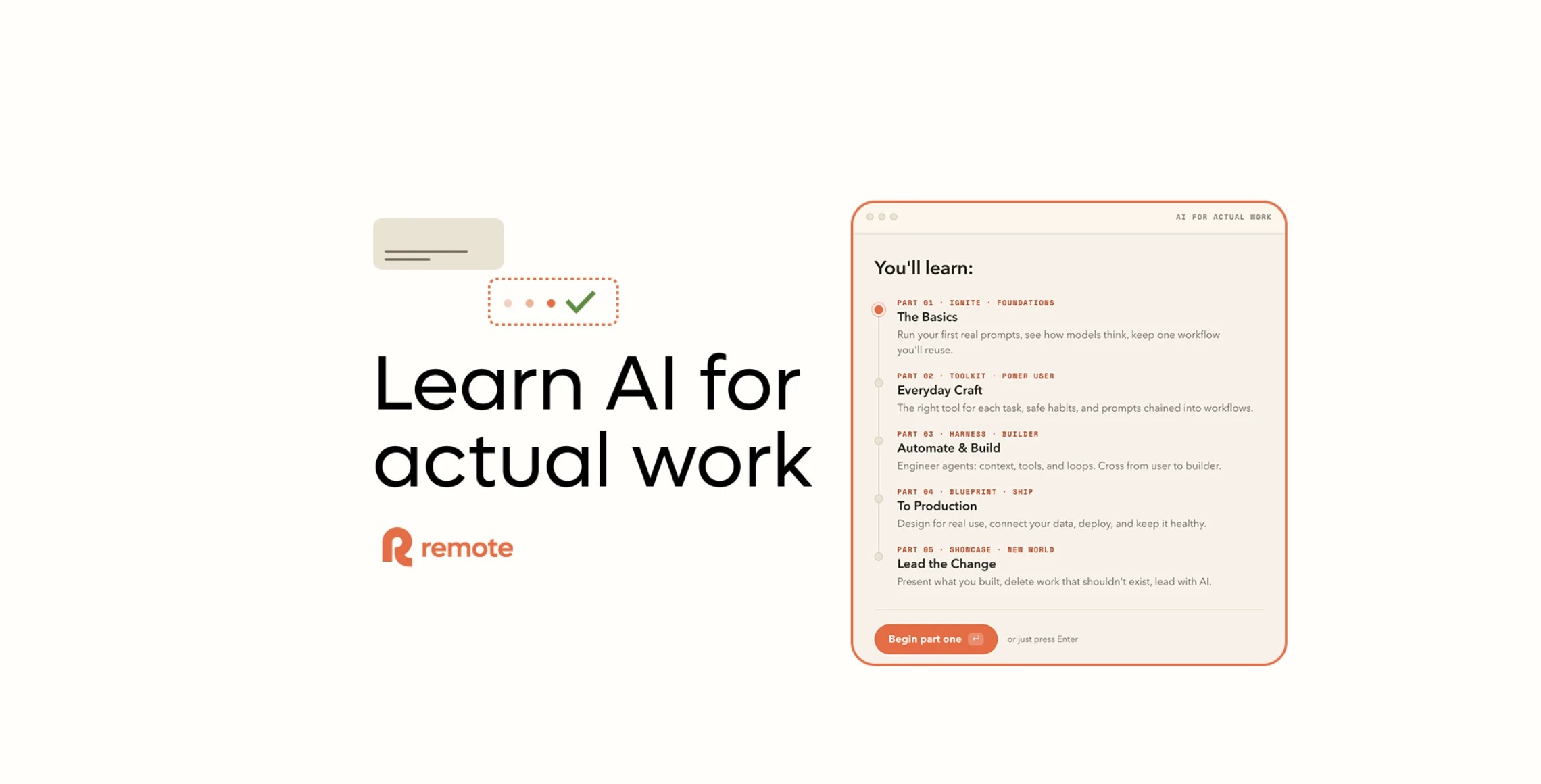
The public course moves from foundations into practical workflows, then into building with agents and shipping what you make. The five parts are:
- Ignite · Foundations: run your first real prompts, see how models think, and keep one workflow you’ll reuse
- Toolkit · Power User: choose the right tool for each task, build safe habits, and chain prompts into workflows
- Harness · Builder: engineer agents with context, tools, and loops, and cross from user to builder
- Blueprint · Ship To Production: design for real use, connect your data, deploy, and keep it healthy
- Showcase · New World: present what you built, delete work that should not exist, and lead with AI
The point is simple: start with the basics and leave with one useful workflow.
Why AI training should reach every team
AI unlocks capacity in people who were never expected to build tools before. That is the part worth paying attention to.
The person closest to a problem often knows the most about how to solve it. They know which work is repetitive and which internal processes are ready to be improved.
That is why AI training should reach every team. When more teams understand how to use AI at work, more people can improve the work they already know best.
The training has to be plainspoken and practical. It also has to respect that people are starting from different places.
The upside is that every team gets more capable.
Responsible AI is part of the foundation
Responsible AI use at work belongs in the foundation.
Making AI accessible also means being clear about risk.
The more people use AI, the more important it becomes to teach responsible AI habits early. People need to understand what data can and cannot be shared. They need to know when an output needs review. They need to understand that AI can be useful and still be wrong.
This is especially important in the kinds of work Remote does.
Payroll, employment, compliance, tax, legal, and people operations affect real people’s lives. In this work, accuracy and trust depend on keeping human judgment in the loop.
Good AI training should help people ask better questions:
- Is this task appropriate for AI?
- What context am I giving the model?
- What information should stay out?
- How will I check the answer?
- Who needs to review this before it is used?
- Is this making the work better, or just faster?
Speed needs judgment.
The point is to help people use AI well.
Why we are making it free
We built this because we needed it. Other founders asked if they could use it. The more we thought about it, the clearer it became that useful knowledge should stay open.
Remote has always shared a lot of how we work, from our public handbook to the way we build culture in the open. This course follows the same idea.
It is free, with no strings attached. We will keep improving it as we keep learning at Remote.
AI fluency is becoming a basic work skill. The sooner people build it, the more agency they have over how their work changes.
That matters.
A lot of people are quietly worried they are behind, especially when everyone else seems to understand the thing they are still trying to learn.
That uncertainty is exactly where good training should begin.
AI for Actual Work assumes nothing. If you can use a browser, you can start, and if life gets busy, you can come back when you have time.
Start here
Use it yourself or bring it into your company. If it helps someone else get up to speed, share it with them too.
People should be able to use AI, question it, shape it, and build with it at work.
That is why we built AI for Actual Work.
The first lesson is ready.
Start for free at aiforactualwork.com.
Subscribe for the latest updates
Sign up for our newsletter to get the inside scoop on all things remote work and global employment.