  • Home
  • Global Employment
    • Payroll nav iconGlobal Payroll RunRun compliant payroll easily
    • Employer of Record nav iconEmployer of RecordExpand globally with zero entity cost
    • Contractor of Record nav iconContractor of RecordCompliantly engage contractors worldwide
    • Contractor Management nav iconContractor ManagementOnboard and manage contractors globally
    • PEO nav iconPEOOutsource complex employment tasks
    Infrastructure
    • Remote EmbeddedSeamlessly integrate HR into workflows
    • PlatformManage your global HR core
    • ConnectNewConnect your AI tools with Remote
    • IntegrationsStreamline processes with essential business tools
    Services
    • Ask an ExpertGet expert help on global HR & compliance
    • Background ChecksSimplify your candidate screening processes
    • Compliance WatchtowerStay ahead of compliance risks
    • Device ManagementProvision and track IT devices globally
    • Entity SetupEstablish compliant entities fast
    • Mobility & RelocationRelocate employees with ease
    • BenefitsManage employee benefits with ease
  • Global Coverage
    • Country ExplorerFind global employment support by country
    • US State ExplorerSimplify hiring across all US states
    • Compare RemoteSee how we stack up against others
    Growth Stage
    • StartupsAgile global HR & payroll solutions for growing companies
    • Mid-MarketExpand teams with tailored HR solutions
    • EnterpriseGlobal HR for large businesses
    Partner with us
    • Strategic Technology PartnersFlexibly embed global HR into your platform
    • Become a PartnerExplore partnership opportunities with us
    • Remote BuildComing soonIntegrations and AI Automations Consulting
    Case Studies
    • flowela-header@2x.webp

      Scaling global talent with ease: How Flowla achieves 100% HR visibility with Remote

      Learn more
  • Tools & Calculators
    • Misclassification risk calculatorCheck employee misclassification risk by country
    • Employee cost calculatorCalculate total employee costs in any country
    • Contractor payout calculatorExplore currency options and payout speeds for global contractors
    Learn with Remote
    • Research & Guides
    • Case studies
    • HR Glossary
    • Checklists & Templates
    • Job Description Library
    • Webinars
    • Events
    • Newsroom
    • Salary & Talent Insights
    • Insights center
    • Get support
    • See all resources
    Blog
    • Global Payroll
    • EOR & PEO
    • Contractor Management
    • Compliance
    • Taxes
    • Work visas & permits
    • Changelog
    • Explore the blog
    Blog Posts
    • CFO Global Payroll Forecast

      The most complex global payroll market isn't the one you'd guess

      Learn more
  • Pricing
Login

Blog / Contractor Management

Automated contractor payments on Remote


James Doman-Pipe

By James Doman-Pipe

February 5, 2025
automated-contractor-payments-featured
  • Streamline admin with automatic approvals and payments
  • Automatic processing for faster payments
  • Not using Remote for contractor management yet?

Making payments is a pain, especially when you work with multiple contractors.

Not only do you need to find the right payment provider (and add yet add another tool to manage), but you’ll need to carefully copy and paste account details, double check the right payment amounts, and triple check that everything is set up correctly. And if you get it wrong, it’s almost impossible to get that money back. Especially if you’re working with regular contractors for the same amount each month on an ongoing basis, the time involved in invoice approvals and payment administration can quickly add up.

At Remote, we’re making it easier for employers to onboard, manage, and pay contractors wherever they’re based in a legally compliant, simple way.

Streamline admin with automatic approvals and payments

On the Pay contractors screen in Remote, you’ll now see a new option for Automatic invoice payments .
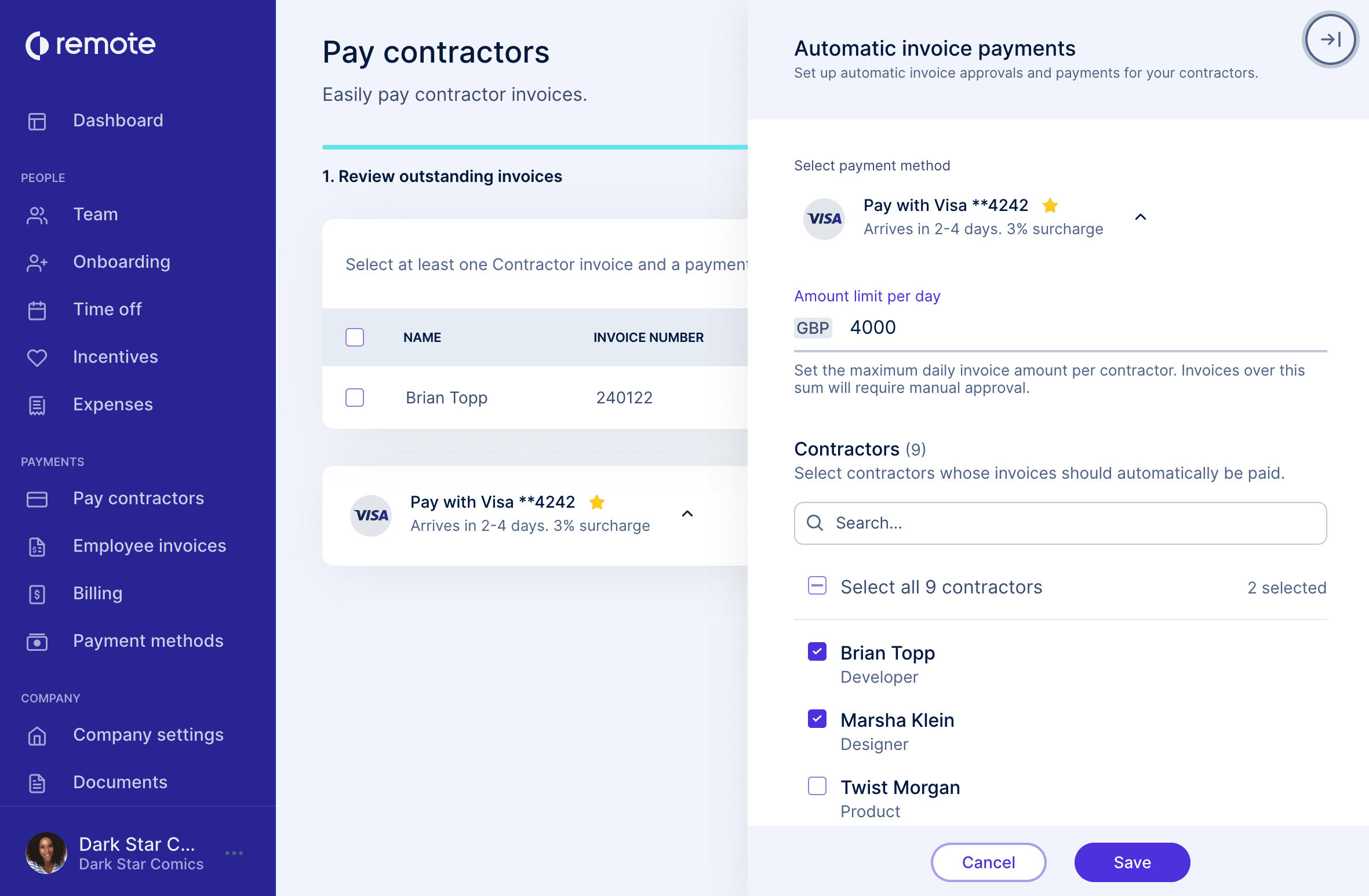
Automated approvals and payments in Remote

Here, you can set up automatic invoice approvals and payments for your contractors.

Getting up-and running is as easy as 1-2-3!

  • Select the payment method that should be used from the card and direct debit methods you’ve already set up. This is the method that will be used to pay any applicable contractor invoices.

  • Next, you can set a maximum daily invoice amount per contractor. Any invoices under this threshold will be paid automatically. Invoices above this amount will need manual approval, to help prevent fraud.

  • Lastly, you can select the contractors whose invoices should automatically be paid! You can select individual contractors, or everyone you work with.

You’ll receive the same email notifications as usual, and invoices will appear in your dashboard. You can download invoices for your records and share payment receipts to make life easier for your finance team.

This new feature is live now for employers who pay in USD, with Euro and other currencies rolling out shortly.

Automatic processing for faster payments

With automatic payments in Remote, your contractors will be paid faster without the traditional delay.

No more waiting for approvals, reviews, and manual payments. Invoices are typically settled within 3-6 days after a successful payment, helping contractors to improve their cashflow situation, and helping you build stronger working relationships.

Not using Remote for contractor management yet?

It’s easy to get started with fast, free, and flexible contractor management with Remote. Sign up today to onboard new contractors, ensure compliance with localized contracts, and pay contractors in over 130+ countries around the world.

Subscribe for the latest updates

Sign up for our newsletter to get the inside scoop on all things remote work and global employment.

Subscribe
  • Hire International Employees
  • Hire International Contractors
  • Expand Globally
  • Onboard Global Teams
  • Remote API
  • Run Payroll
  • Offer Global Benefits
  • Offer Stock Options
  • US Expansion Offering
  • Global HR
  • Pricing
  • Employer of Record (EOR)
  • Contractor Management
  • Payroll
  • Remote Relocation
  • Expansion Consulting Services
  • Recruit
  • Global HR for Startups
  • Global HR for Small Business
  • Global HR for Enterprise
  • Global Employment Blog
  • Research
  • Case Studies
  • Webinars
  • Developer API Docs
  • Compare Remote
  • Tech Stack Integrations
  • Remote Handbook
  • Country Explorer
  • US State Explorer
  • Employee Cost Calculator
  • Misclassification Risk Tool
  • Global Infrastructure
  • Security and Compliance
  • Security and Compliance: Trust Portal
  • Transparent Price Guarantee
  • IP Protection
  • Customer Experience
  • Startup Founders
  • Remote for Employees
  • Freelancer Hub
  • For jobseekers
  • About
  • Careers
  • Newsroom
  • Events
  • Marketplace
  • Support
  • Remote Status
  • Contact Us
  • Accessibility Statement
  • Partner Programs
  • Affiliates
  • VC Partners
  • HR Consultant Partners
  • Financial Advisor Partners
  • Law Firm Partners
  • Partner Perks Marketplace
  • Remote Recruiter Network

Copyright © 2026. Remote Technology, Inc. All rights reserved.

Numbers on this page are based on internal data compiled from existing customer base and speed assumption is based on the fact that standard onboarding may take 30 days and Remote’s average onboarding time is 2.3 days.

App Store(opens in new tab)Google Play(opens in new tab)

  • Privacy Policy
  • Cookie Policy
  • Terms of Use
  • Disclaimer
  • Imprint