How to Put AI to Work by Monday: 8 Practical Remote Agent Workflows

If your company bought an enterprise AI license, you’ve probably lived this moment: you opened the chat window, stared at the blinking cursor, had zero idea what to ask, and went right back to your spreadsheets.
You aren't alone. Sixty percent of enterprise workers have access to AI, but less than half touch it on a given day. The roadblock isn't laziness—it's that 26% of leaders we surveyed say the hardest part is finding practical, high-value use cases for daily work.
When your job touches global payroll, local labor codes, and employee bank details, "just experiment with prompts" is terrible advice. You can’t dump unredacted salary data into an open-source model and hope it doesn't leak.
That’s why we built Remote Agent. A conversational assistant built directly into Remote that understands your workforce operations out of the box, with no CSV exports or prompt engineering required.
Real adoption doesn't happen because an executive sent an all-hands memo about transformation. It happens when you use AI to kill a specific, annoying task that usually eats your Monday morning: auditing a pay run, estimating an international conversion, or tracking down an obscure local notice period without opening twenty browser tabs.
Here are eight concrete ways to put Remote Agent to work on the problems already sitting on your desk.
How Remote Agent works (and why legal won’t panic)
Remote Agent lives right in your Remote dashboard. Hit ⌘+J (or Ctrl+J), and the workspace opens. No browser plugins, no API keys, and no custom integrations to wire together.
Because it runs directly on Remote’s core infrastructure rather than a generic third-party wrapper, it operates under three non-negotiable guardrails:
- Strict permissions, isolated data. The Agent strictly shares your existing permissions—it cannot see or surface anything outside your assigned role. Your payroll data, contracts, and compensation records are never used to train external AI models.
- Read-only connectors. When pulling context from external tools like Notion or Linear, the Agent only reads data. It cannot overwrite, edit, or delete a single file outside Remote.
- Zero autonomous execution. The Agent cannot move money, execute pay runs, or amend contracts on its own. It handles the manual calculation and spots the anomalies, but nothing moves until a human reviews and hits "Confirm."
You get the speed of conversational AI without handing the agent the keys to your bank account.
1: Stop digging through spreadsheets
The Friction: Auditing mid-month payroll changes across headcount, working hours, and one-off bonuses usually requires cross-referencing multiple internal exports before bank cut-off.
• The Prompt:
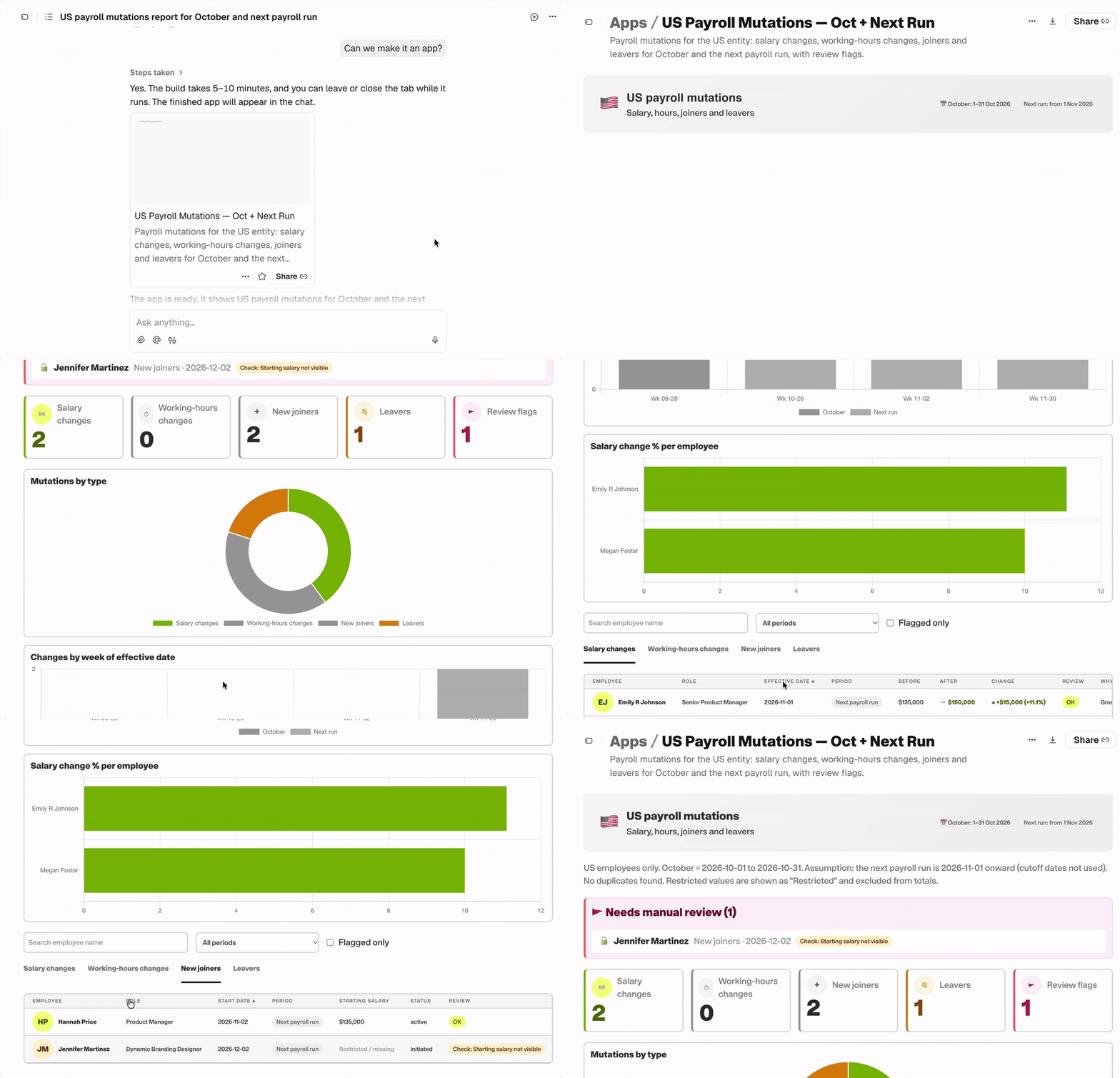
"Generate a payroll mutations report for our US entity covering October and the upcoming run. Group changes by salary adjustments, hours, joiners, and leavers, then flag any unverified variances.”
What Happens: Remote Agent scans the live payroll cycle, isolates the deltas, and structures them into a categorized summary. From there, you don't have to keep re-running the prompt: ask "Can we make it an app?" and the Agent spins up an interactive micro-dashboard in minutes that your team can pin and reuse every cycle.
2: Assemble a cross-platform "View of My Day" using Connectors
The Friction: People Ops tasks don't live in a single tab. You're constantly toggling between pending payroll runs in Remote and employee request tickets logged in tools like Linear or Notion.
• The Prompt:
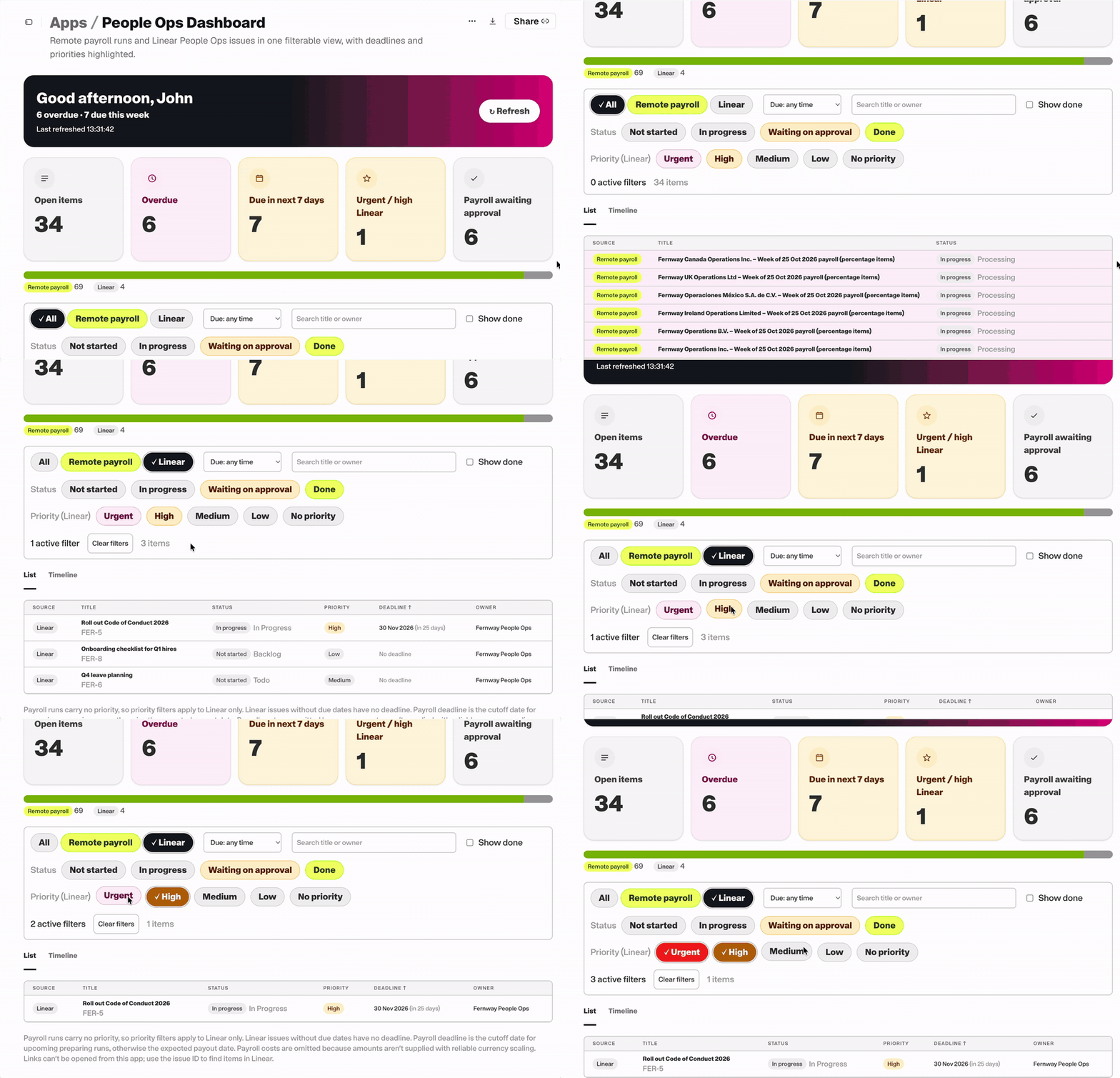
"Pull all pending Remote payroll runs awaiting approval and combine them with our active People Ops issues in Linear. Build a filterable view showing overdue, due this week, and high-priority items."
What Happens: Remote Agent queries both platforms through read-only connectors and spins up a unified dashboard. You see your payroll approvals and ticket deadlines side-by-side without leaving Remote or touching data in Linear.
3: Track upcoming payments and unpack your biggest invoice
The Friction: Multi-currency invoices land with competing deadlines and line items packed with prorated adjustments, leaving finance to scramble over what to pay first and why the balance jumped.
• The Prompt:
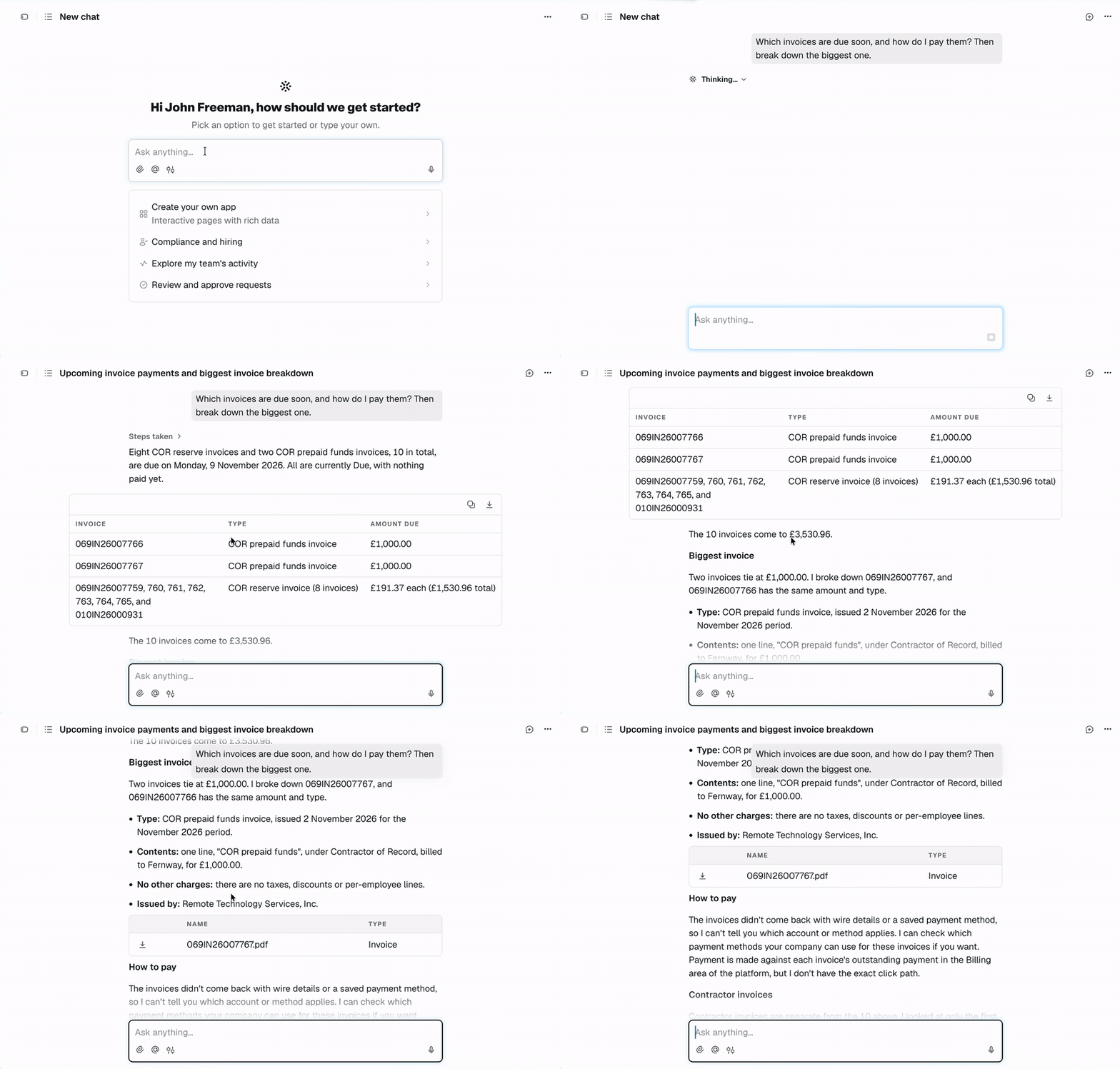
"What invoices are due soon, how do I pay them, and can you break down the biggest one to show what drove the cost changes compared to last month?”
What Happens: Remote Agent lines up your immediate payables with dates and payment methods, then isolates the largest bill. It translates the line items into an executive readout, spotlighting the exact severance payouts, tax true-ups, or FX shifts behind the difference.
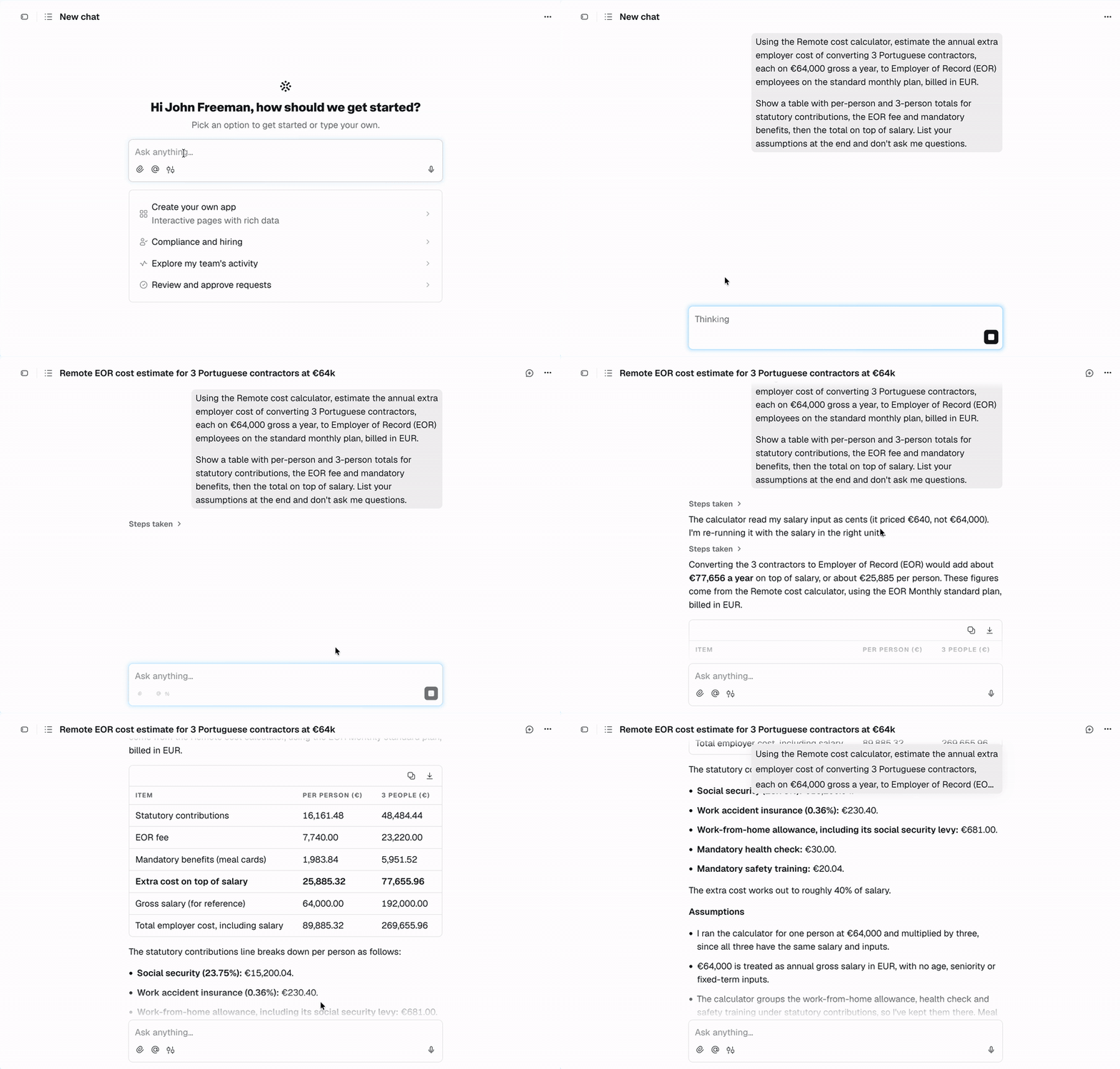
4: Forecast an international contractor conversion
The Friction: Converting a contractor to full-time EOR isn’t a base salary swap. You have to factor in local payroll taxes, mandatory benefits, and statutory bonuses, which usually means waiting days for a quote.
• The Prompt:
"Calculate the annual employer cost difference if we convert 3 contractors in Colombia to full-time EOR employees at their current compensation. Include mandatory benefits, local bonuses like the Prima de Servicios, and platform fees.”
What Happens: Remote Agent models the statutory employer contributions alongside existing contractor rates and outputs an itemized annual comparison, showing exact local bonus and tax obligations before you jump into the budget meeting.
5: Turn a statutory wage update into a recurring compliance check
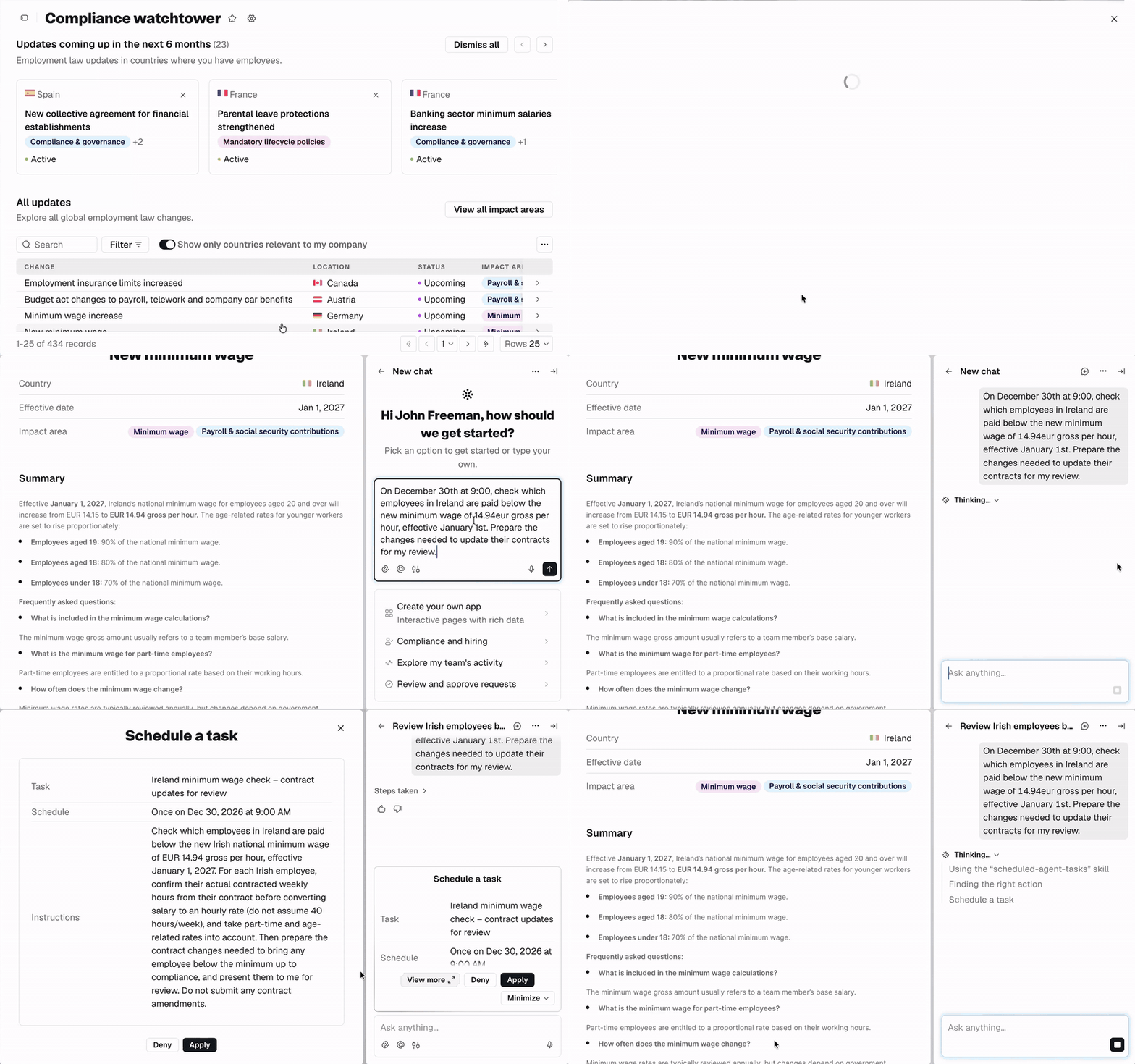
The Friction: Keeping up with regional minimum wage hikes means checking local gazettes, cross-referencing compensation sheets, and hoping you don't miss an effective date.
• The Prompt:
"Check our active headcount against upcoming statutory minimum wage changes taking effect next quarter in Ireland and Germany. Then, set a scheduled task to run this audit every Monday before payroll cut-off."
What Happens: Remote Agent identifies affected workers in those jurisdictions and flags any current salaries below the incoming statutory floor. It then locks in an automated recurring task that surfaces future discrepancies directly in your inbox without manual prompting.
6: Build an app to track document signature status
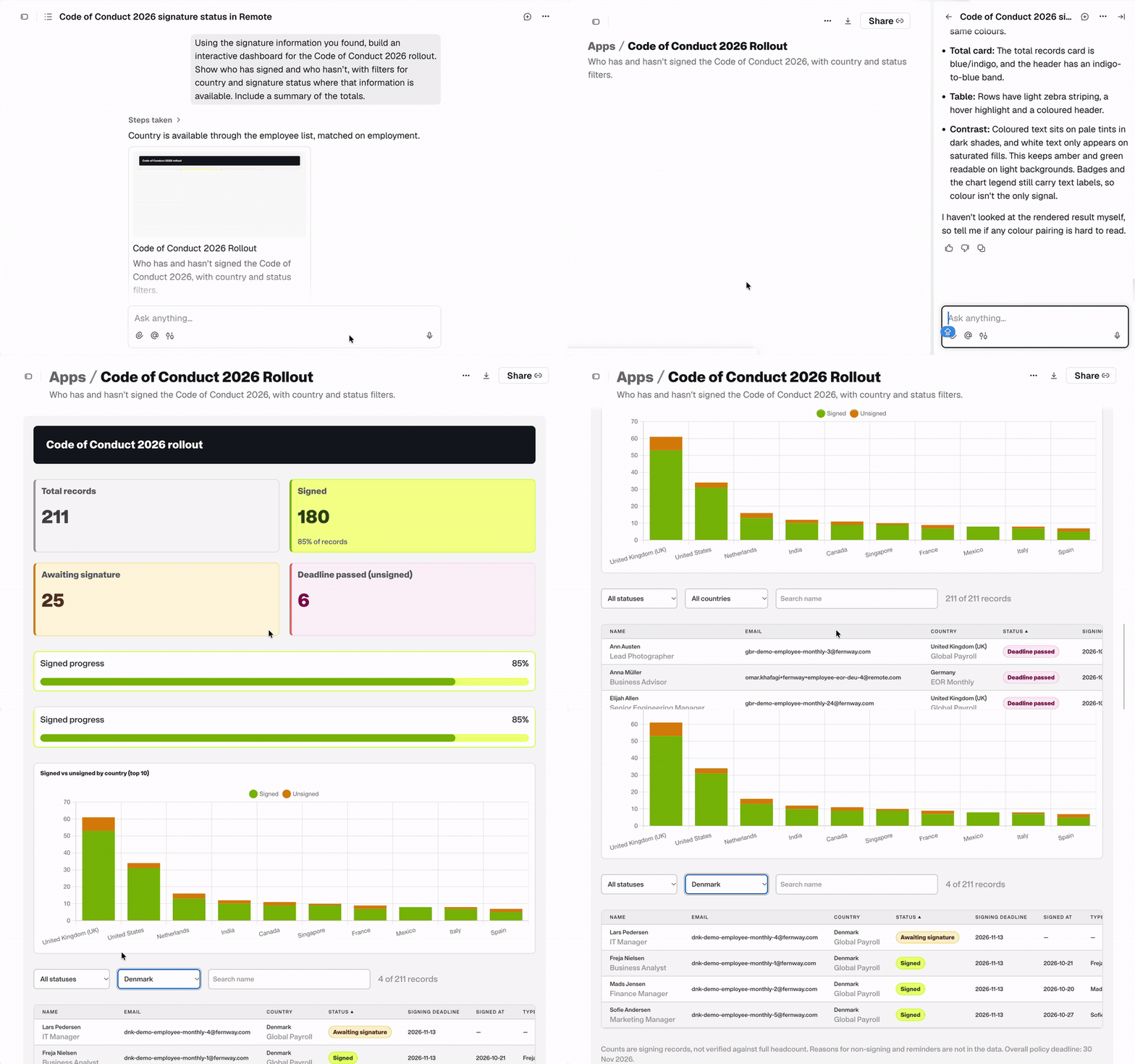
The Friction: Rolling out a company-wide policy update means chasing signatures across countries, manually matching signed PDFs to employee profiles, and badgering managers for status reports.
• The Prompt:
"Using the signature information you found, build an interactive dashboard for the Code of Conduct 2026 rollout. Show who has signed and who hasn’t, with filters for country and signature status where that information is available. Include a summary of the totals."
What Happens: Remote Agent links document signature records to active employee directory data and spins up a dedicated micro-app. You get an interactive dashboard with one-click country filters and completion totals you can share directly with leadership.
7: Sanity-check a cross-border offer package before sending
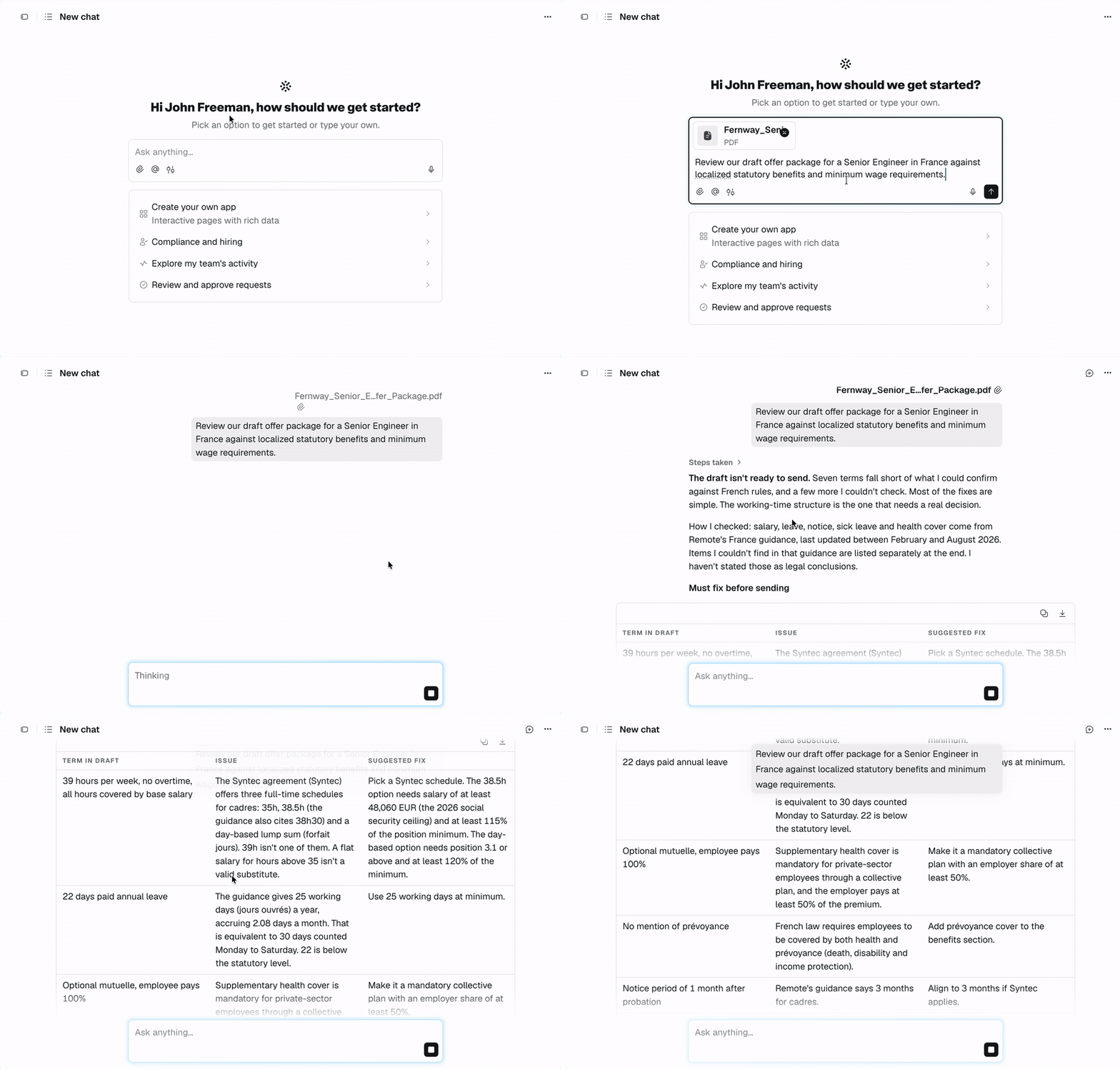
The Friction: Drafting international offers usually stalls on local legal nuances such as mandatory transport subsidies, localized health coverage tiers, or CBA wage floors. Leaving recruiters stuck waiting for outside counsel.
• The Prompt:
"Review our draft offer package for a Senior Engineer in France against localized statutory benefits, mandatory employee perks, and collective bargaining agreements. Flag any missing compliance items or required clauses."
What Happens: Remote Agent audits the compensation and benefit terms against local French labor standards. It flags required statutory contributions—like mandatory mutual insurance (mutuelle) and transit subsidies—so you can correct gaps before sending the document to the candidate.
8: Build a self-serve global hiring guide for your team
The Friction: Hiring managers constantly ping People Ops with the same entry-level questions: notice periods in the UK, probation rules in Brazil, or mandatory leave in Japan. You spend half your week repeating answers already written in legal wikis.
• The Prompt:
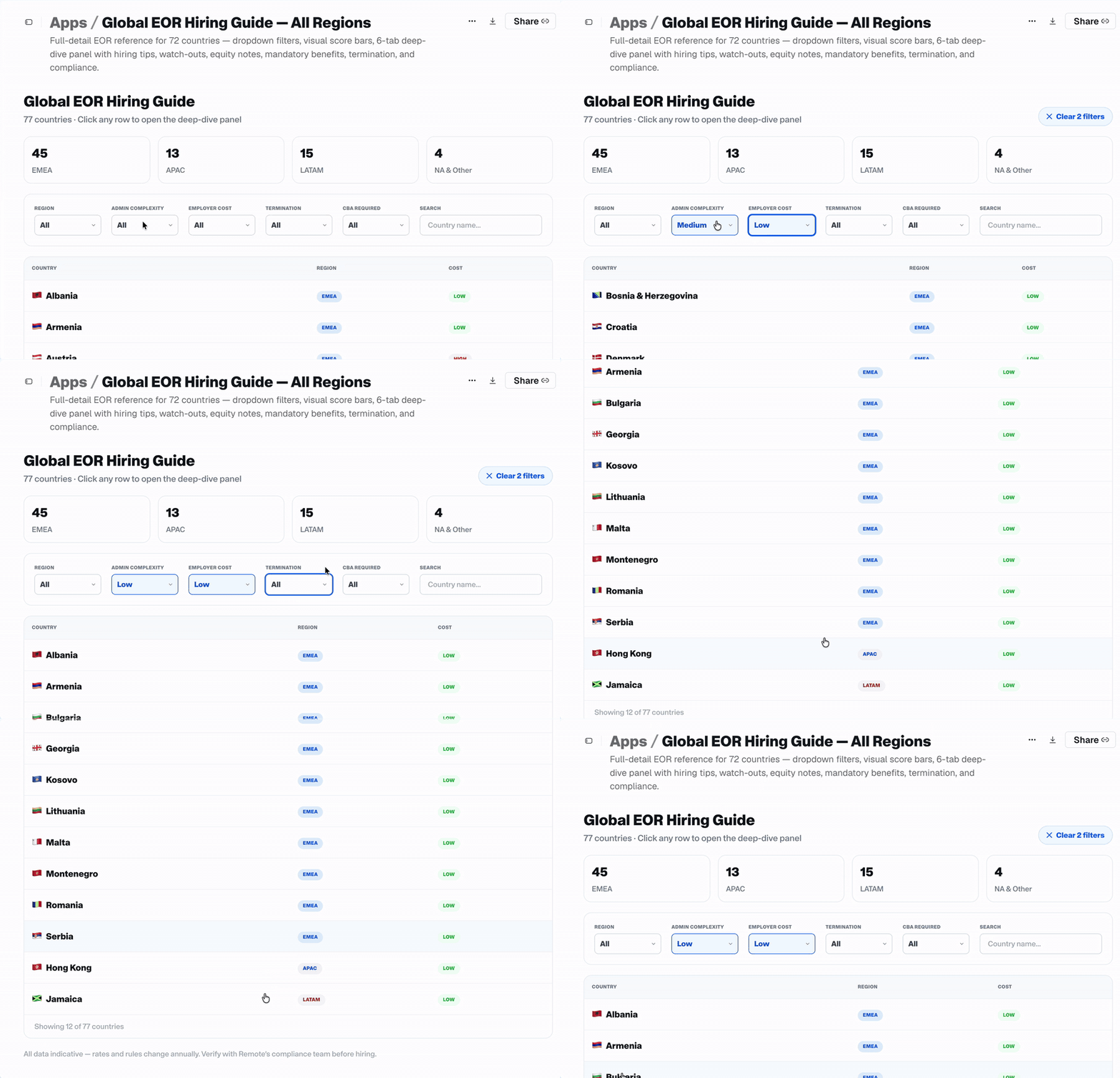
"Build an interactive global hiring guide using our verified knowledge base. Let managers select a country to view mandatory benefits, statutory probation limits, standard notice periods, and minimum wage floors, with direct links to our onboarding workflows.”
What Happens: Remote Agent converts static employment documentation into an interactive, self-serve internal app (similar to how Zapier built theirs). Hiring teams can look up local compliance standards independently, taking repetitive regional questions off your plate.
How to put this to work on Monday
Don’t try to automate your entire department’s operations before your second cup of coffee. The fastest way to build team confidence with AI is to hand off one tedious task you were already dreading.
The next time a repetitive question hits your desk:
- Open the workspace: Hit
⌘+J(orCtrl+J) directly inside your Remote dashboard. - Ask one real question: Pick something concrete: "What is the statutory notice period for an employee in Portugal?" or "Show me all contractors with invoices pending approval."
- Review the output: Get a clean, structured answer in seconds, verified against your account permissions, with zero risk of altering live workforce data or moving funds.
Real AI value doesn't come from prompt engineering theory. It comes from killing the repetitive micro-tasks that drag down your week.
Log in on Monday, hit ⌘+J, and hand off the first task on your list.
Looking to build custom internal tooling or automated workflows on your workforce data? Check out the Remote API and Remote MCP documentation to connect your systems directly.
Subscribe for the latest updates
Sign up for our newsletter to get the inside scoop on all things remote work and global employment.