Setting up as a freelance contractor
Enjoy the freedom of freelancing without getting bogged down by admin
Invoicing, tax obligations, contracts and even simply getting paid can feel overwhelming when you work for yourself. Thankfully, there are ways to remove the time sink and hassle of admin. Treat this guide as a practical plan to get set up to receive payments quickly and with confidence, so you can concentrate on what matters most: your clients.
How to set up the right business registration
Setting up contract agreements for new clients
How to get paid as an independent contractor
How to manage and monitor invoices
Managing independent contractor taxation obligations
Liability considerations for independent contractors
Accounting requirements for independent contractors
How do I ask the company I’m working with to convert me to an employee?
5 ways Remote makes life easier for contractors and their clients
Onboard with Remote and get set up in minutes
How to set up and get paid as a freelance contractor: your blueprint to remove frustrating admin
As an independent contractor, you’re in charge of every aspect of your business: finding and retaining clients, delivering projects, handling admin, and marketing. You’re also expected to manage tasks that may be outside your skillset, such as drafting everything about your business: getting and keeping clients, working on projects, handling admin, and marketing your business. You are also responsible for tasks that might lie outside your expertise, such as writing up contracts and managing taxes.
It can feel daunting to draft a contract if you’re unsure which employment laws affect your work, particularly when a client is overseas. You might also worry about losing a chunk of your pay to processing fees.
We want to reassure you that you can manage these responsibilities. Setting up and getting paid as a freelance contractor can be straightforward, fast and efficient — no matter where your clients are located.
This guide is packed with practical tips for independent contractors, especially if you’re new to running your own business. We’ll outline a process to manage your workload and explain how automation can simplify things.
We’ll cover the four trickiest areas for freelancers and show practical ways to handle them:
Contracts
Payments and fees
Invoicing
Tax
Ready to simplify your freelance business? We’ll begin at the start: setting up your business.
How to set up the right business registration
To start working as an independent contractor you’ll need to pick a legal structure for your business. That choice determines your tax and legal obligations and will vary depending on where you’re tax resident. Countries — and sometimes regions — have different rules for independent contractors.
Most countries provide a few common choices
Individual entrepreneur. This is a straightforward option for solo contractors. In some jurisdictions, such as France there’s a legal difference between the person and the business; in others there isn’t.
Partnership. A partnership agreement between parties. Often there is no legal separation between the partners as individuals and the business itself.
A limited liability company. A formal legal entity separate from the individual running it. Usually the company earns the income and bears the losses rather than you personally.
Other structures may exist depending on where you operate. For example, Australia, for instance, offers a trust model where a trustee runs the business on behalf of beneficiaries.
Each structure has advantages and drawbacks, but many contractors opt for the individual entrepreneur setup because it’s generally easy to set up and run.
For country-specific employment rules, see Remote’s Country Explorer — our global hiring guides are full of practical details to help you set up your freelance business.
Read more on how to become an independent contractor

Contractor Management
Setting up contract agreements for new clients
Lots of contractors find writing client contracts daunting, especially if it’s not something they usually do. Some even think about proceeding without one.
Skipping a contract is risky. Agreements are essential because they protect you in many ways. Typically a contract will cover:
Contracts spell out the tasks, deliverables and project requirements. That helps prevent scope creep and ensures you aren’t expected to do extra work without fair pay.
Contracts set out payment terms clearly — the amount, payment method, and any milestones or deadlines.
Contracts deal with ownership and rights to any intellectual property created during the project. Clear IP clauses help avoid disputes down the track.
Contracts explain the conditions and steps for ending or pausing the agreement, protecting you from sudden cancellations.
Contracts clarify the contractor–client relationship, helping prevent misclassification problems for both parties.
While useful, contracts can be complicated because contractor rights and working rules vary by country. Using a random template you find online or creating your own may leave you with a contract that isn’t legally enforceable where your client is based — or worse, one that works against you.
Contractors can ensure their arrangements with local and international clients are legally sound by using Remote’s compliant, tailored contract templates. These are adapted to country-specific laws so contractors stay compliant wherever the client is located.
If you already have a contract you’re happy with, you can continue using it. When you onboard to the Remote platform as a contractor, you can upload your own agreement instead of using ours.
Learn more about contracts here.
More on independent contractor agreements

Independent contractor agreements: a guide for businesses
The dangers of contractor misclassification
In almost every country, independent contractors are classified differently than employees. Many employee protections — like healthcare, pensions and share options — usually don’t apply to contractors. Choosing contracting gives you the freedom to pick clients and work hours, but it also means giving up those employee benefits.
Despite that distinction, some companies may deliberately misclassify contractors to avoid legal obligations; other times it’s accidental. Whether intentional or not, misclassification can lead to penalties and fines for both you and your client. Your client could face significant fines in their jurisdiction, and you might suffer consequences for incorrect tax payments in your country.
Bear in mind it’s in your interest to be correctly classified as a contractor.
First, a contractor has the freedom to decide how to work. In the United States, for example, companies can’t dictate how a contractor does the work or force set hours — the contractor delivers the agreed outcome in their own way. Second, proper contractor classification gives you more control over how you earn.
Penalties for misclassification vary by country. To avoid them, work with clients to make sure your role isn’t misclassified. Discuss duties and review the working arrangement regularly. If your role becomes more integrated with a client’s company over time, you can ask to be converted into an employee.
Learn more about the risks of misclassification in these guides

Employee and independent contractor misclassification: expert guide

The consequences of misclassifying employees as contractors
How to get paid as an independent contractor
As an independent contractor you’re responsible for invoices and collecting payment. That often means billing each client separately and accepting whichever payment method they prefer — which can be slow and inefficient.
Some of the most common ways to collect payments include:
Bank transfers
Bank transfers — transfers between bank accounts. They’re usually fast but often come with significant service fees.
Direct deposits. A payment straight into your bank account. Also quick, but clients may be charged fees. It becomes trickier if you’re dealing with multiple clients or clients overseas.
Paper checks. You can deposit paper checks via an app, but they’re becoming less common due to slow processing. Physical checks can also be lost or stolen.
Money orders. Money orders are a secure international option in some places but inconvenient — they must be bought in person and, like checks, can be lost, stolen or delayed. They’re also sometimes treated with suspicion.
Virtual wallets. Digital wallets are becoming popular and provide quick payments, but some clients won’t accept them and there are security considerations to weigh.
Digital transfer services like PayPal and Wise. These services are convenient and often let you invoice clients, but they can take a cut or apply high currency exchange margins which can add up.
Alternatively, you can use a trusted provider like Remote. Our platform offers a simple, secure and reliable way to be paid in your local currency — with no hidden charges. Add your bank account as a withdrawal method in your Remote dashboard and client payments are deposited straight into your account.
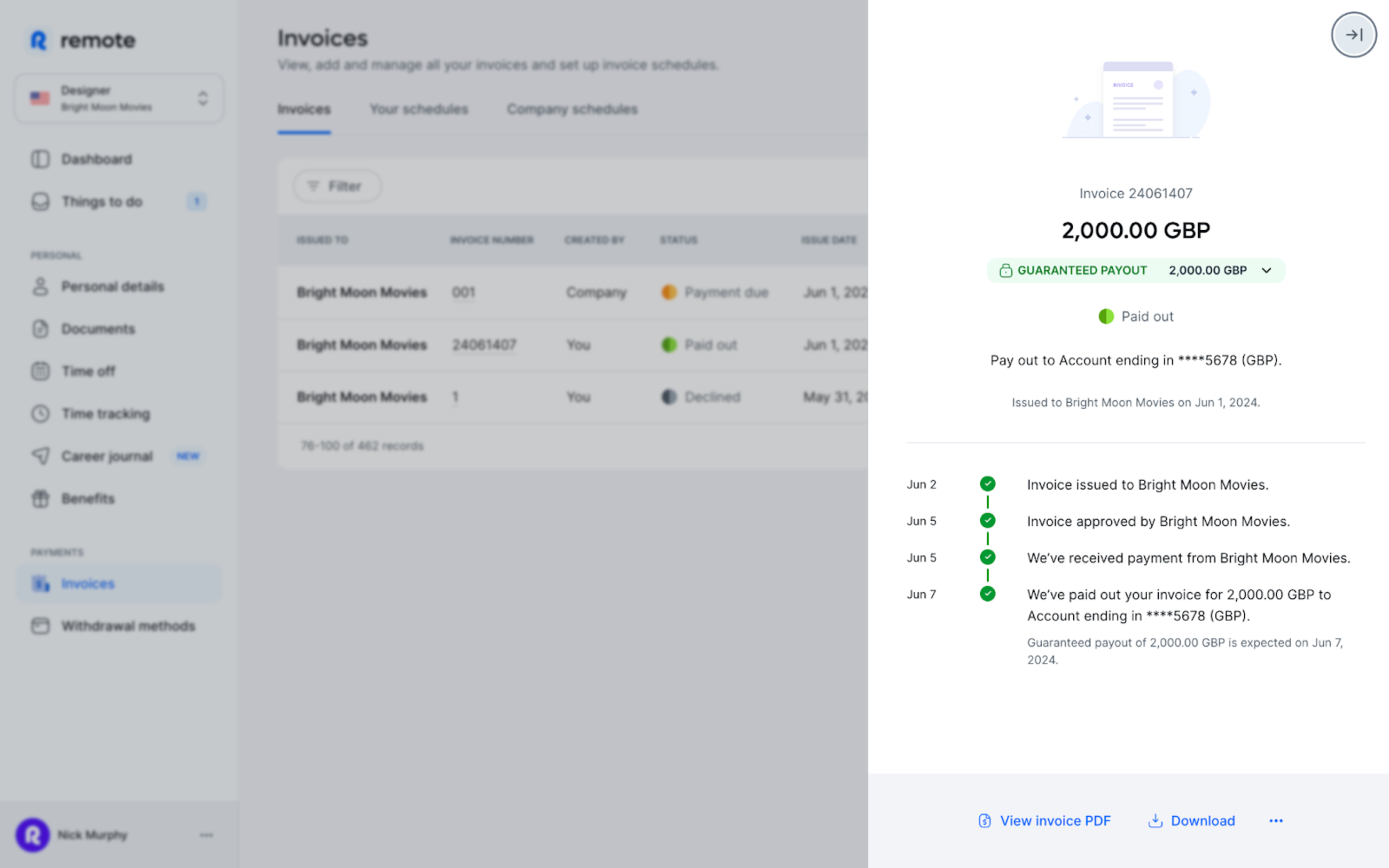
You don’t need to keep checking the dashboard: Remote emails you as soon as an invoice is paid. Learn more about how our platform can help with payments.
Your practical guide to freelance invoicing plus a free template

How to invoice as a freelancer: a simple guide and a free invoice template
How to get paid by international clients
International payments are more complicated than domestic ones. Currency conversion, arranging wire transfers and steep processing fees can make accepting international payments stressful.
Remote simplifies that process. Our contractor management service covers more than 200+ countries and territories, making it straightforward to be paid in the currency you prefer, regardless of what currency you invoice in. Here’s the process:
1. Invoice
You invoice your client in the currency that suits them and upload the invoice to Remote’s contractor management platform.
2. Payment is made
The client pays their invoice in their own currency.
3. Payment is received
When Remote receives the payment, we convert it into your chosen currency before paying you out.
Contractors have two payout choices. You can add your bank account details on Remote where payouts are powered by Wise, or you can use a Stripe Connect account. You can update your preferred currency and payment details at any time.
What about fees?
We work with partners to keep pricing fast and affordable. We do charge your clients a $29 USD fee for payment processing, but as a contractor the only fee you pay is a mid-market currency conversion fee. If you’re being paid in your preferred currency already, there’s no fee at all.
You can learn more about our fees in this support centre article.
How to manage and monitor invoices
Invoicing as an independent contractor can be a chore. Many people stitch together tools to manually create, send and track invoices — an inefficient, slow and error-prone approach.
By automating your invoicing, you can simplify billing and get back to paid work. Remote can help you do that.
With Remote you won’t rely on spreadsheets, email and other manual tools to invoice. Our platform lets you create invoices, submit them for approval and receive payment in your local currency without switching tools. Upload your invoices to Remote, we’ll send them to your clients and you’ll see status updates as they move through approval.
Setting up billing
As a contractor you submit invoices to clients through your Remote dashboard. There are two ways to do this:
1. Upload your own invoice
Create an invoice showing the invoice date and amount, then submit it as a PDF.
2. Create an invoice on Remote
Use our templates to build an invoice on platform. You can also set up recurring invoices that are sent automatically to your client.
To learn more, check out this article in our Help Centre.
Managing independent contractor taxation obligations
As an independent contractor you’re responsible for paying your own taxes, but tax systems differ by country so obligations vary.
In the US, for example, you pay taxes directly to the government. In other countries clients may deduct tax at source. For details on contractor tax rules where you live, visit Remote’s Country Explorer page.
This is why correct contractor classification matters — it affects how you pay tax.
Liability considerations for independent contractors
When you’re employed, the company manages liability. As a sole operator you’re personally liable for things like finance and tax debts, meaning your personal assets could be used to settle business liabilities. To reduce this risk many contractors get liability insurance.
It’s also wise to protect yourself legally when entering client agreements. Remote’s legal team vets our contract templates so you remain compliant where you work.
Take charge of your business with Remote Freelancer Hub
Manage clients, organise contracts and invoices, and get paid — all from one place.
Accounting requirements for independent contractors
You don’t need to publish financial statements annually as a contractor, but you must keep organised records of accounts, including client invoices and business purchases, to track income and manage tax.
You can manage records yourself using accounting or bookkeeping software, or engage a professional bookkeeper or accountant.
Consider opening a separate bank account for business expenses; in some countries a business account is required once turnover passes a certain threshold.
How do I ask the company I’m working with to convert me to an employee?
Start a conversation with your client and outline the risks and benefits of switching to an employer–employee arrangement. Make clear how it can help both parties — not just you. There are several reasons a company might want to convert you to an employee. For example, the client may gain more control over your hours and how tasks are completed.
Listen to any client concerns. International clients might feel they can’t hire you without a local legal entity. In that case, suggest using an Employer of Record (EOR).
An EOR acts as the local employer on a company’s behalf and handles HR admin, including local payroll, benefits and tax compliance. Typically, an EOR will also manage HR administrative tasks.
Remote, for example, is an EOR and can help your client stay compliant with the laws in your country.
To find resources on advocating for yourself as a remote worker, download our Remote Toolkit.
5 ways Remote makes life easier for contractors and their clients
There’s a lot to consider when you set up as an independent contractor. Remote can take care of many of these challenges so you can focus on growing your business and serving clients. Here’s how we help:
Learn more about how Remote can help you as an independent contractor here.
Onboard with Remote and get set up in minutes
Working on your own terms is liberating, but admin can pull you away from what you want to do: help clients, get paid promptly and grow your business.
Using a stable, trusted platform like Remote lets you manage these obligations quickly and efficiently so you can focus on your business goals.
Our platform makes it quick and simple to start as an independent contractor — we guide you through onboarding and steps to verify your identity for security. You’ll also be asked to upload any necessary tax documents for secure storage.
Learn more about how Remote can save you — and your clients — time and resources.
Get started with Remote today.