How to set up as a freelance contractor
Embrace the flexibility of freelancing and remove the administrative load
Invoicing, tax responsibilities, contracts and even simply getting paid can feel overwhelming when you work independently. Thankfully, there are ways to cut down the time and frustration of admin. Use this guide as a practical plan to set up payment processes quickly and confidently so you can concentrate on what matters most: your clients.
How to set up the right business registration
Setting up contract agreements for new clients
How to get paid as an independent contractor
How to manage and monitor invoices
Managing independent contractor taxation obligations
Liability considerations for independent contractors
Accounting requirements for independent contractors
How do I ask the company I’m working with to convert me to an employee?
5 ways Remote makes life easier for contractors and their clients
Onboard with Remote and get set up in minutes
How to set up and get paid as a freelance contractor: your blueprint to eliminate annoying admin
As an independent contractor, you are responsible for running everything related to your business: finding and keeping clients, delivering projects, handling administration and marketing. You’ll also take on tasks that may not be your speciality, such as preparing contracts and managing taxes.
Drafting a contract can be intimidating if you’re unsure which employment laws apply to your situation, especially when a client is overseas. You may also worry about receiving payments and losing a chunk of earnings to processing charges.
We want to reassure you that you can handle all these responsibilities. In fact, setting up and getting paid as a freelance contractor can be quick, straightforward and effective — regardless of where your clients are located.
This guide offers practical advice for independent contractors, particularly if you’re new to running your own business. We explain how to create a reliable process for managing your work and how automation can simplify that process.
We cover the four most worrying areas for freelancers and show ways to handle them with confidence:
Contracts
Payments and fees
Invoicing
Tax
Ready to learn more about simplifying your freelance business? Let’s start at the very beginning: setting up your business.
How to set up the right business registration
To start working as an independent contractor you must first decide on a legal structure for your business. That choice determines your tax and legal responsibilities and will depend on where you declare tax residency. Different countries, and sometimes regions, have their own rules for contractors.
Most jurisdictions provide a few common options
Individual entrepreneur. This structure suits single, independent contractors. In some countries, such as France there can be a legal distinction between the person and the business; elsewhere those lines are blurred.
Partnership. A partnership arrangement where partners are often not separate from the business entity in legal terms.
A limited liability company. A formal legal entity separate from the individual operating it. Usually, profits and losses are attributed to the company rather than to you personally.
Other structures may be available depending on where you operate. For example, Australia offers a trust arrangement where a trustee runs the business on behalf of beneficiaries.
Each option has advantages and drawbacks, but many independent contractors prefer the individual entrepreneur model because it is easier to establish and maintain.
For country-specific employment law guidance, visit Remote’s Country Explorer — our global hiring guides contain practical details to help you establish your freelance operation.
Read more on how to become an independent contractor

Contractor management
Setting up contract agreements for new clients
Many contractors find drafting client contracts uncomfortable and may feel daunted if it sits outside their skillset. Some even consider operating without any written agreement.
Not using a contract is a risky choice. Contracts are essential because they protect you in several ways. Typically, a contract will cover:
Contracts list the specific tasks, deliverables and project requirements. This helps freelancers prevent scope creep and ensures they are not expected to perform work beyond the agreed scope without fair compensation.
Contracts set out payment terms clearly, including amounts, payment methods and any milestones or deadlines.
Contracts define ownership and rights to intellectual property created during the project. Clear IP clauses protect freelancers from later disputes.
Contracts set out how the agreement can be terminated or suspended and the procedures involved. This helps shield contractors from abrupt cancellations.
Contracts clarify the relationship between contractor and client, protecting both parties from misclassification issues.
Despite their value, contracts can be complicated because contractor rights and working conditions vary internationally. Using a generic template or drafting a contract yourself could mean the document is not legally enforceable in some jurisdictions, and might even disadvantage you.
Contractors can protect their relationships with local and overseas clients by using Remote’s compliant, tailored contract templates. These documents are adjusted to meet country-specific law so contractors remain compliant no matter where a client is located.
If you already have a contract you trust, you may continue to use it. When you join Remote as a contractor, you can upload your existing contracts instead of using ours.
Learn more about contracts here.
More on independent contractor agreements

Independent contractor agreements: a guide for businesses
The dangers of contractor misclassification
In almost every jurisdiction, independent contractors are classified differently to employees. Many protections and benefits employees receive — such as healthcare, pensions and share schemes — generally do not apply to contractors. As an independent contractor you trade those benefits for the liberty to choose clients and decide when, where and how you work.
Despite this, some companies may deliberately misclassify contractors to avoid legal duties; other times it occurs by mistake. Whether accidental or intentional, misclassification can lead to penalties and fines for both you and your client. Your client may face large fines in their jurisdiction, and you could suffer consequences for not having paid the correct tax in your own country.
Bear in mind it’s in your best interest to be correctly classified as a contractor.
Firstly, a contractor has the freedom to work as they see fit. In the United States, for example, companies cannot dictate how a contractor performs a task or insist on fixed hours. The contractor delivers the agreed project in their own way and on their own schedule. Secondly, proper classification gives you greater control over your earnings.
Penalties for misclassification vary by country. To reduce risk, coordinate with your clients to confirm your status is correct. Discuss your duties and review the working arrangement periodically. If your role becomes more integrated into a client’s business, you can request to be converted into an employee.
Learn more about the risks of misclassification in the guides below

Employee and independent contractor misclassification: expert guide

The consequences of misclassifying employees as contractors
How to get paid as an independent contractor
As an independent contractor, you must manage invoicing and collecting payments yourself. That typically means billing each client individually and receiving payments via their preferred methods — which can be slow and inefficient.
Some of the most common ways to collect payments include:
Bank transfers
Bank transfers, a movement of funds between two bank accounts. Although fast, these transfers often carry substantial service fees.
Direct deposits. Funds are placed directly into your bank account. Also quick, but may attract fees for your client, and can be complex when dealing with multiple or international clients.
Paper checks. Paper checks can be deposited via a mobile app, but processing is increasingly slow and the method is becoming obsolete. Physical checks can also be lost or stolen.
Money orders. Money orders are a secure international payment option in many countries but are inconvenient: they must be purchased in person and—like checks—can be lost, stolen or delayed in the post. They may also raise suspicion because scammers sometimes use them.
Virtual wallets. Virtual wallets are growing in use and offer a quick payment route, but some clients may not accept them and there are security considerations to weigh.
Digital transfer services like PayPal and Wise. These services are convenient and often let you invoice clients, but they can charge fees or apply unfavourable exchange rates that reduce your take-home pay.
Alternatively, you can use a trusted solution such as Remote. Our platform provides a simple, secure and dependable way to be paid fast in your local currency — with no hidden charges. Add your bank account as a withdrawal option in your Remote dashboard, and client payments will be deposited directly into your account.
You don’t need to keep refreshing the dashboard to check payments: Remote emails you as soon as an invoice is settled. Learn more about how our platform can help with payments.
Your practical guide to freelance invoicing, plus a free template

How to invoice as a freelancer: a simple guide and a free invoice template
How to get paid by international clients
Accepting international payments is more complicated than domestic ones. Currency conversion, arranging wire transfers and costly processing fees can make accepting international payments stressful.
Remote simplifies this process. Our contractor management service covers more than 200+ countries and territories, enabling you to be paid in your preferred currency regardless of the invoice currency. Here’s how it works:
1. Invoice
You invoice your client in whatever currency suits the client and upload the invoice to Remote’s contractor management platform.
2. Payment is made
The client settles their invoices in their own currency.
3. Payment is received
When Remote receives the funds, we convert them into your chosen currency before making a payout to you.
Contractors have two payout options. You can add your bank account details directly in Remote where our payouts are powered by Wise or you may use a Stripe Connect account. You can update your preferred currency and payment details at any time.
What about fees?
We partner with a number of providers to keep pricing fast and as competitive as possible. We do charge your clients a $29 fee for payment processing, but as a contractor, the only fee you pay is a mid-market currency conversion fee. If you’re being paid in your preferred currency already, there’s no fee at all.
You can learn more about our fees in this support centre article.
How to manage and monitor invoices
Invoicing as an independent contractor can be laborious. You may find yourself piecing together a range of tools to create, send and track invoices manually, which is inefficient. Manual systems are slow, monotonous and prone to mistakes.
By automating your invoicing, you can streamline billing and return your focus to paid work. Remote can assist with that.
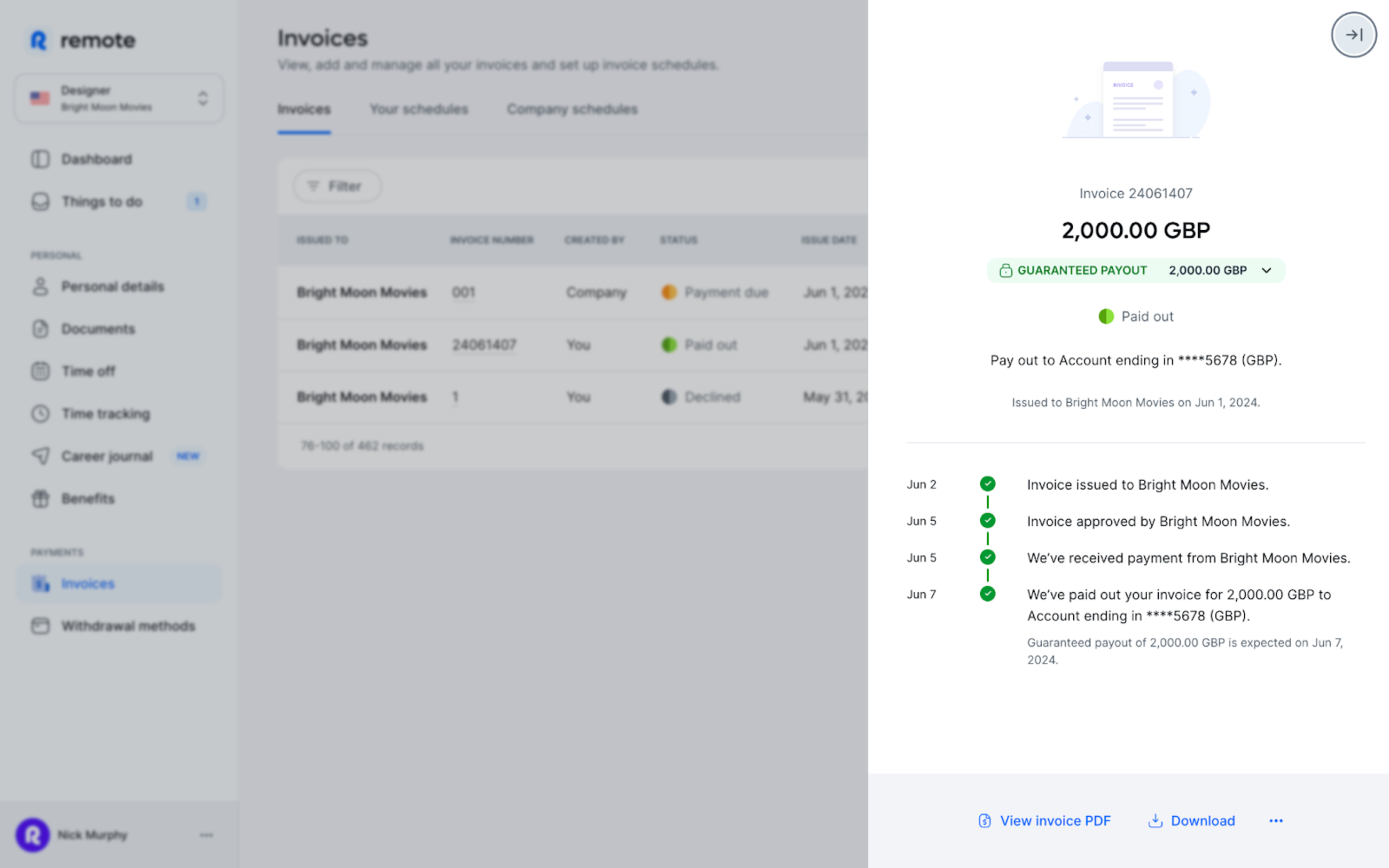
With Remote you no longer need spreadsheets, email chains or other manual tools to bill clients. Our platform enables you to create invoices, submit them for approval and receive payments in your local currency without switching to different software. That means no more back-and-forth emails: simply upload your invoices to Remote, we will route them to your clients and provide status updates as they move through approval.
Setting up billing
As a contractor, you submit invoices to clients via your Remote dashboard. You can do this in one of two ways:
1. Upload your own invoice
Create an invoice showing the invoice date and amount, then submit it as a PDF.
2. Create an invoice on Remote
Use our templates to build an invoice on the platform. You can also set up recurring invoices that are sent automatically to your employer.
To learn more, see this article in our Help Centre.
Managing independent contractor taxation obligations
As an independent contractor you are responsible for your own taxes. Tax systems differ by country, so the way taxes are handled varies across jurisdictions.
In the US, for instance, you pay taxes directly to the authorities. In other countries your clients may be obliged to withhold tax from payments. For specifics about contractor tax responsibilities in your country, consult Remote’s Country Explorer page.
This is one reason why correct contractor classification matters: it affects how your taxes are paid.
Liability considerations for independent contractors
Employees usually have their employer handle liability. As a sole proprietor you bear responsibility for debts such as finance and tax obligations, which can put your personal assets at risk. To manage this exposure, many independent contractors take out liability insurance to reduce that risk.
It’s also wise to protect yourself legally when negotiating and signing client agreements. Remote’s legal team reviews our contract templates to help ensure compliance in the country where you work.
Take charge of your business with Remote Freelancer Hub
Manage your clients, organise contracts, invoices and get paid — all in one place.
Accounting requirements for independent contractors
Independent contractors do not need to publish annual financial statements, but you must keep orderly records of accounts, including client invoices and business purchases, so you can monitor income and meet tax obligations.
You can manage these records using accounting or bookkeeping software, or engage a professional bookkeeper or accountant.
Consider opening a separate bank account for business transactions; some jurisdictions require a business account once turnover passes a certain threshold.
How do I ask the company I’m working with to convert me to an employee?
Open a conversation with your client and discuss the pros and cons of moving to an employer–employee arrangement. Emphasise the benefits for both sides — not just for you. There are several reasons a company may wish to convert you to an employee. For example, you might point out that the client will have greater control over your hours and how tasks are completed.
Listen carefully to any client concerns. International clients may be reluctant to hire you without a local legal entity. In those cases, suggest they use an Employer of Record (EOR).
An EOR is a company that employs workers in other countries by acting as the local employer for another business. Typically, an EOR handles HR administration, including local payroll, benefits administration and tax compliance.
Remote, for example, is an EOR and can ease the transition while keeping your client compliant with local laws.
To learn more about advocating for yourself as a remote worker, download our Remote Toolkit.
5 ways Remote makes life easier for contractors and their clients
There’s a lot to consider when becoming an independent contractor. Remote can help with many of these tasks so you can focus on growing your business and serving clients. Here’s how:
Learn more about how Remote can help you as an independent contractor here.
Onboard with Remote and get set up in minutes
Having the freedom to work on your own terms is empowering. Yet administrative duties can pull you away from your core priorities: supporting clients, getting paid promptly and growing your business.
Using a reliable, established platform like Remote helps you handle these responsibilities quickly and effectively so you can concentrate on business goals.
Our platform makes it quick and straightforward to start as an independent contractor — we guide you through onboarding and the identity validation steps required for security. You’ll also be asked to upload any necessary tax documents for secure storage.
Learn more about how Remote can save you — and your clients — time and resources.
Get started with Remote today.